Request
Received- Current handler
- Website form
- Next action
- Assign owner
- Due state
- Now
Email-first response operations for roofing
LumioForge runs an approved response and follow-up path around the systems your team already uses. When a supported homeowner reply is detected, eligible outreach stops and a person takes over.
Email-first. Additional channels and integrations require technical review before they are promised.
Request
ReceivedOwner
AssignedNext action
ActiveSee the deliverable first
Review the public-route evidence, source context, response-flow model, and internal questions before deciding whether to request a company-specific Map.
Sample artifact
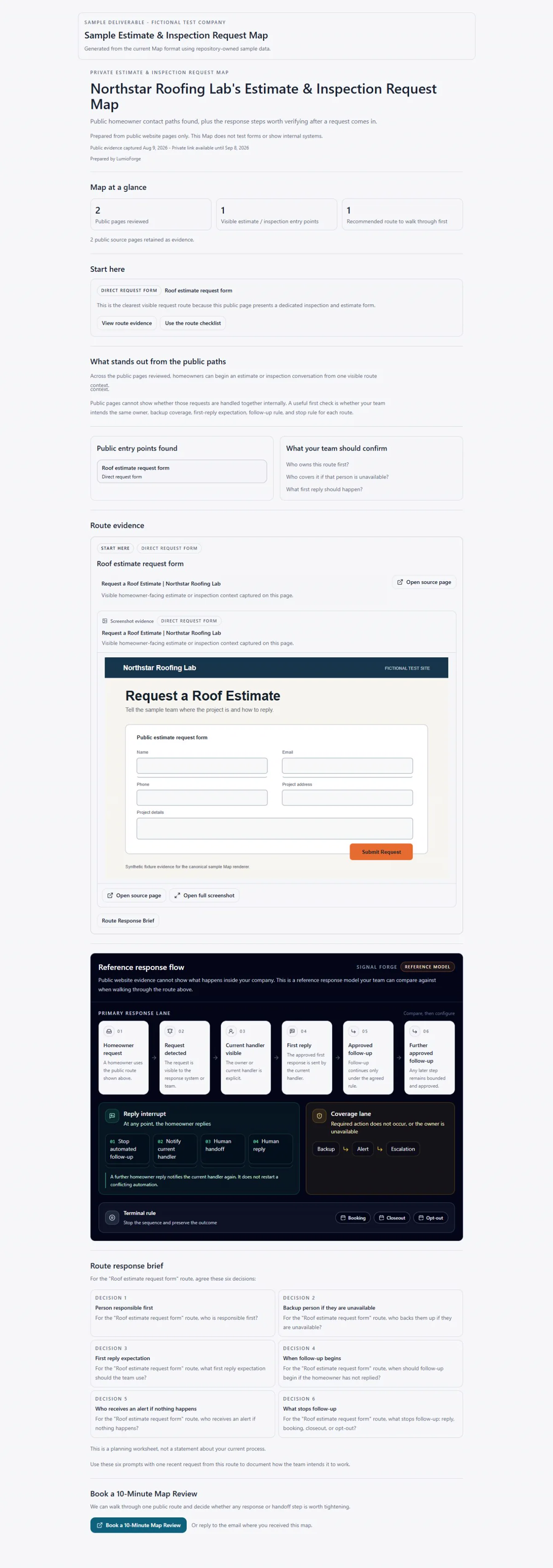
Fictional company and sample inputs. No real company or private data. No customer, trial, or performance data.Open the complete sample image
LumioForge is not positioned as a CRM replacement. It gives the agreed request-response path an explicit owner, next action, reply state, stop condition, and human handoff around the current stack.
If a request arrives and somebody replies once, what happens next still needs explicit ownership. That is a question to verify—not a claim about your company.
One request, end to end
The main path stays bounded in one composition. A separate exception branch shows what becomes owned when the expected action is absent.
Request
ReceivedOwner
AssignedFirst response
SentFollow-up
EligibleHomeowner reply
ReceivedStop
StoppedHuman handoff
Taken overProduct evidence
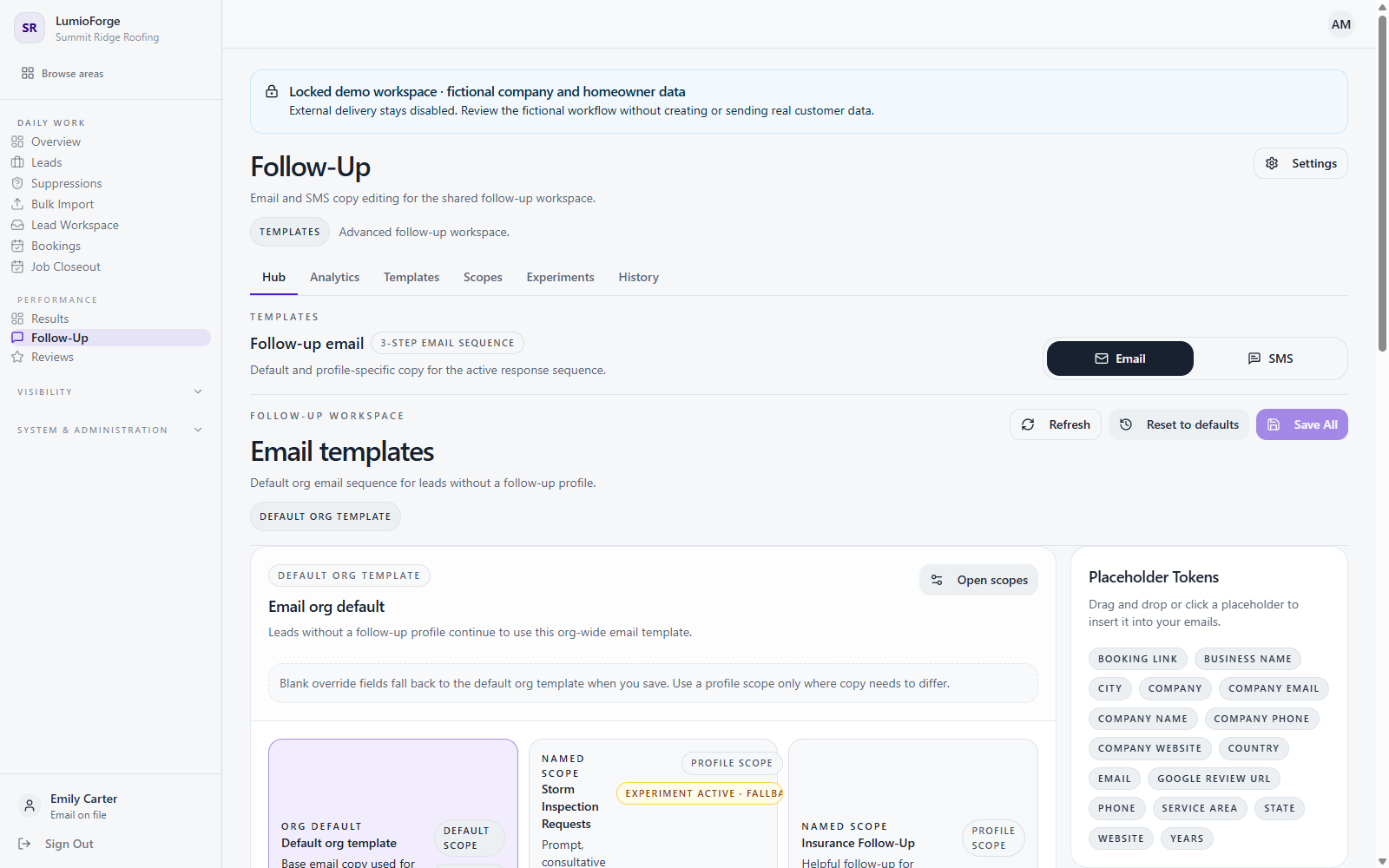
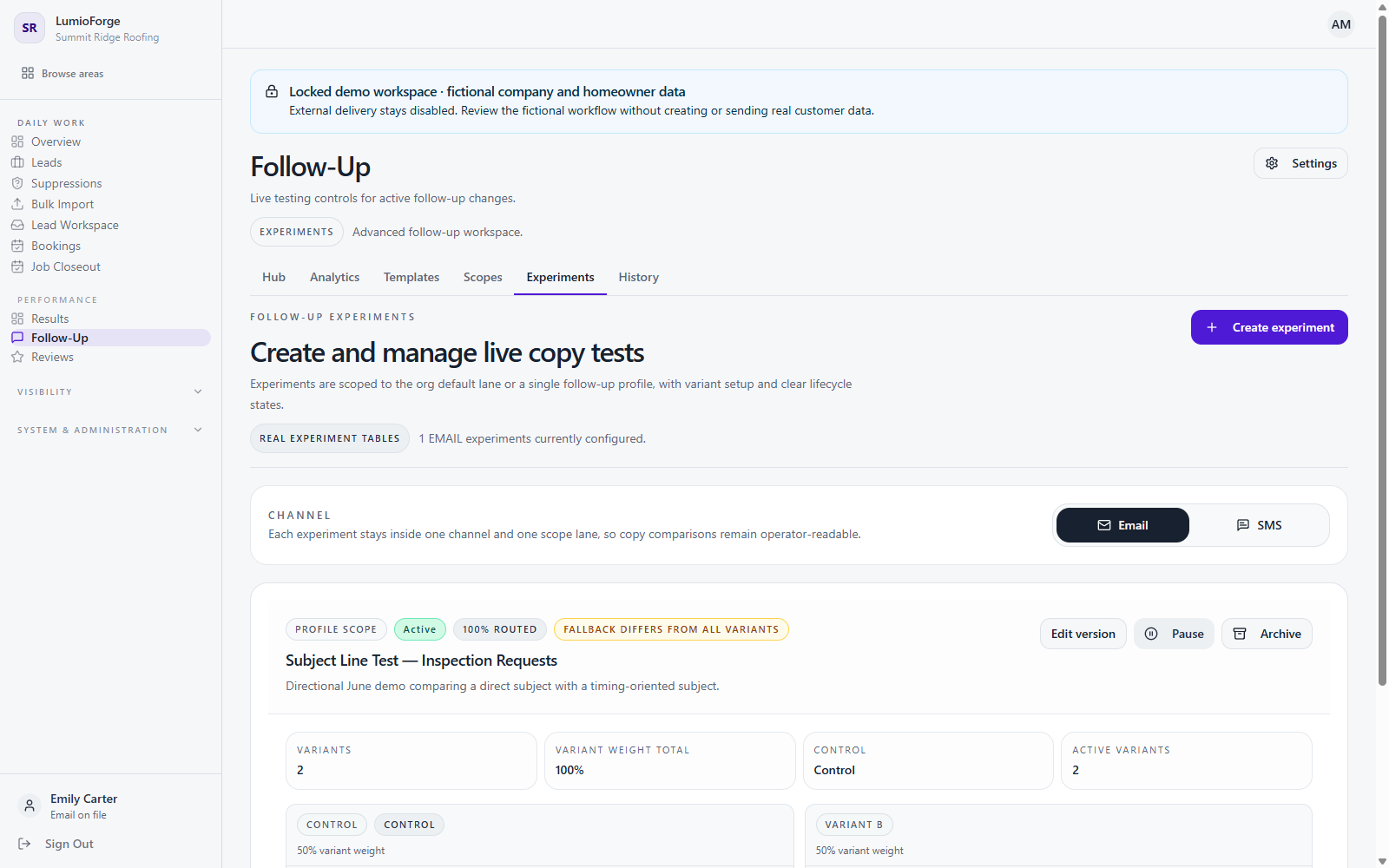
These product views show how approved follow-up content and experiments are organized. They are interface evidence, not a customer outcome or live deployment claim.
The reply moment
Change the illustrative reply state to see the queued follow-up stop and the current handler move back to a person.
| Conversation | State | Owner | Next action | Signal |
|---|---|---|---|---|
| Estimate form | First response due | Office lead | Send approved first response | Action now |
| Homeowner email | Replied | Assigned rep | Review homeowner reply | Follow-up stopped |
| No response yet | Waiting | Office backup | Review next approved touch | Due next |
Illustrative ownership states — not customer data
Your CRM vs LumioForge
Roofing CRMs increasingly include messaging, tasks, and workflow automation. The fit question is whether the complete response path is already dependable in practice.
You want this narrow response path designed, configured, tested, and operated around the current process because those states are not yet dependable.
Your CRM remains the customer and job system of record while LumioForge handles only the agreed response workflow that has been tested for that environment.
Integration compatibility is reviewed before any live workflow is promised.
Other ways to solve it
The right choice depends on what already works, what your team can maintain, and whether the central need is workflow control or a different service category.
| Option | Best when | Trade-off | What your team still owns |
|---|---|---|---|
| Configure your CRM | The required automation already exists and someone can maintain it. | Setup and testing become internal administration work. | Configuration, review, and process discipline. |
| Office / manual follow-up | Volume is manageable and human ownership is already dependable. | Coverage depends on staff consistency and backup habits. | Training, supervision, and unavailable-person coverage. |
| DIY automation | You have technical operations capacity and want maximum control. | Your team designs, tests, and changes the logic. | Architecture, QA, monitoring, and maintenance. |
| Receptionist / AI response service | The central need is answering calls or autonomous conversations. | It uses a broader communication and handoff model. | Vendor governance, escalation, and final human decisions. |
| LumioForge | A narrow request-response path needs explicit ownership and controls. | It is narrower than a CRM or full AI receptionist. | Business rules, approvals, and homeowner conversations. |
Reliability and integration boundaries
Reliability is a visible state and an owner—not a broad promise. Integration status is assigned only after the relevant path can be reviewed and tested.
No vendor is represented here as currently verified.
See integration boundariesSetup and continuation
The private Setup Map is an implementation artifact used to design a pilot. It is different from the public Estimate & Inspection Request Map offered later on this page.
Price and consent
No automatic paid conversion. No hidden deposit. Cancel under the agreed service terms. No guaranteed leads, jobs, revenue, inspections, or response-time outcome.
Ongoing service covers the agreed, tested response workflow described in the applicable agreement:
It does not currently promise an SLA, unlimited support, continuous optimization, unlimited changes, or integration maintenance. Additional scope requires technical review and a written agreement.
Document scope, configure and test the agreed workflow, disclose limitations, and support the approved launch.
Provide an authorized operator, accurate process details, approved messages, required access, and timely test decisions.
Purchase questions
The right next step may be your current CRM, the public Map, or a pilot-fit call. The answer should follow the operating need.
No. Your CRM can remain the customer and job system of record. LumioForge is a narrower response workflow around an approved request source, subject to compatibility review.
Email is the baseline. SMS or another channel is included only when it is specifically approved, technically supported, and documented for the agreed setup.
On a tested supported reply path, eligible future follow-up stops, the reply state becomes visible, and the responsible person receives the next action.
Yes. The intended workflow makes pause, reassignment, and human takeover explicit for authorized users instead of treating automation as the owner.
The Setup Map defines a named backup and the alert or escalation path for the agreed workflow. Accountability can move, but it should not disappear.
An authorized operator, accurate process details, approved message content, the necessary access, owner and backup decisions, and timely testing feedback.
There is no automatic paid conversion. Continuing service is $500/month only after explicit written consent and the applicable agreement. You can cancel under the agreed service terms.
Then configuring and consistently using your current CRM may be the better decision. LumioForge is not intended to win every fit decision.
Start with the public-source Map. It does not require an account or authorize a pilot.